In the SAN HyperMetro Scenario, the Subpath of the Aggregated Disks Corresponding to the Mounted Volume Is Lost
Symptom
The subpath of the aggregated disks corresponding to the mounted resource is lost.
Root Cause Analysis
Figure 1 SAN HyperMetro subpath loss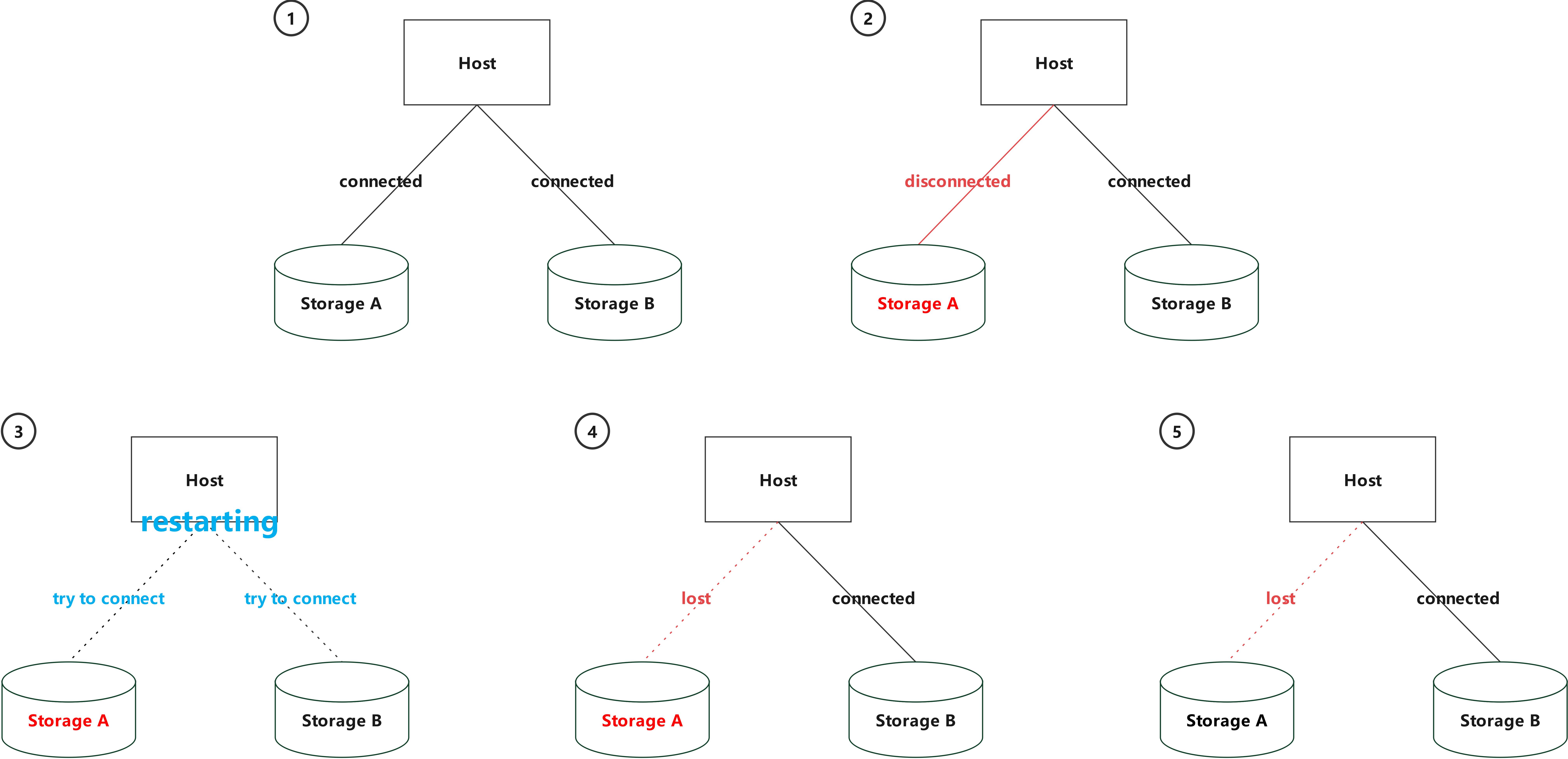
As shown in Figure 1 , if the link between the host and the storage device is disconnected due to factors such as HBA/NIC exceptions, switch/network jitter, or storage array service port faults, the host restarts and triggers disk scanning again. In this case, the link to the faulty storage device is disconnected on the host. After the fault is rectified, the link information is lost after the host scans the disks again. As a result, the lost link will not be automatically restored.
To restore the link, you can drift over a pod to another host and enable CSI to automatically remount the link. To manually restore the lost link on the current host, perform the following steps:
Solution or Workaround (iSCSI Protocol)
Run the following command to check whether the iSCSI node corresponding to the service IP address exists on the host. In the command, 192.168.1.100 indicates the service IP address. If the node exists, go to 3 . If the node does not exist, go to 2 .
iscsiadm -m node | grep 192.168.1.100Run the following command to discover the iSCSI node:
iscsiadm -m discovery -t st -p 192.168.1.100Run the following command to log in to the iSCSI node:
iscsiadm -m node -p 192.168.1.100 -lRun the following command to query the iSCSI host ID based on the corresponding service IP address:
iscsiadm -m session -P3Log in to DeviceManager, choose Services > Host Groups > Hosts > Mapping, and find the host LUN ID corresponding to the LUN.
Run the following disk scanning command to supplement the lost link. In the command, host_lun_id indicates the host LUN ID obtained in 5 , and host_no indicates the host ID obtained in 4 .
echo "- - <host_lun_id>" > /sys/class/scsi_host/host<host_no>/scanRun the following command to check whether the link is supplemented:
multipath -ll
Solution or Workaround (FC Protocol)
Run the following command to query all FC initiators on the current host:
cat /sys/class/fc_host/host*/port_name | awk 'BEGIN{FS="0x";ORS=" "}{print $2}'Run the following command to query the host ID of the initiator whose path is lost. In the command, port_name indicates the initiator name obtained in 1 .
for h in /sys/class/fc_host/host*; do echo $h: $(cat $h/port_name); done | grep <port_name>Log in to DeviceManager, choose Services > Host Groups > Hosts > Mapping, and find the host LUN ID corresponding to the LUN.
Run the following disk scanning command to supplement the lost link. In the command, host_lun_id indicates the host LUN ID obtained in 3 , and host_no indicates the host ID obtained in 2 .
echo "- - <host_lun_id>" > /sys/class/scsi_host/host<host_no>/scanRun the following command to check whether the link has been supplemented:
multipath -ll